What makes the most sense to me is the description of photos for the first-order messiness example in chapter 9. I too have my fair share of pictures stuffed in shoe boxes and drawers. I bought photo albums for my high school graduation party and attempted to fill some of them to put on display, but you can’t possibly put all of your pictures in photo albums because some just aren’t worthy enough, and nobody really wants to have thirty photo albums sitting around (although that reminds me of an episode of “Girls Next Door” where Hugh Hefner has a library of scrap books—nearly 2,000 of them spanning his lifetime).
I never thought of how the value of the pile of pictures goes down the more you add to it. Weinberger says “the more photos you add, the less likely you’re going to be able to find a particular photo, and the bigger the hurdle to making the pile usable” (175). Here's a commercial I recently saw that perfectly describes this.
Sometimes I have a hard time finding my digital photos on my computer too, although it's not as bad as the photos in the shoeboxes. I have hundreds of pictures that I have at least tried to organize by folders on my computer, but it’s still messy. Weinberger says that the more information, or metadata, is attached to each photo, the more potential it has regardless of how messy it may be. This is apparent in the example that is given with Flickr, where we can acknowledge that messiness is okay as long as you can find whatever it is you’re looking for, which makes me think about my house. Although my house is clean, it tends to be on the messy side--clothes may be all over the place, books lying around, etc. (not complaining, we've just always been a very busy family). If my Dad tries to “clean” things up though, my Mom gets angry because she can never find anything afterwards. Even though it is “messy,” my Mom still knows where everything is. And if my Dad puts things where they don’t “belong” then you could be stuck searching for that one shoe you left in the living room for months, like that one photo you just can’t seem to find in your overflowing shoe box of memories.
Tuesday, April 28, 2009

Tuesday, April 21, 2009
Oakland, The World, and the Divide: How We All Missed the Moment
I don’t know much about the issues of access regarding technology or the statistics other than the fact that some people are always at an advantage and others are always at a disadvantage. Coming from an all white, middle class school district, I can’t pretend to speak for African Americans and their struggles with the “Digital Divide.” However, I would like to argue that I believe it’s more than just a race issue, and that issues of class must also be recognized. Although Banks seemed to be primarily concerned with the race issue, he did mention how computers are distributed differently among races and socioeconomic status, which “contributes to the ongoing patterns of racism and the continuation of poverty.”
I’m not saying I’m naive about the fact that African Americans may not have equal access to technology. I just don’t feel comfortable discussing the issue without being completely informed about it, which is why I’d like to pay more attention to equal access for everybody. This was a topic that came up in my Composition of Theory course. We discussed how integrating computers into the classroom will set particular students apart from others and put them at a disadvantage. Since the language of computers is English, all other languages and their cultures are automatically seen as second-class status (Moran 215). Right away that contributes to alienating different races and/or cultures, “especially among families in poverty and families of color” (DeVoss 170). Now obviously it would be ideal for every school to have computers and teachers who were trained to teach with them, but I don’t think computers in schools is enough. Students who own computers are at an advantage over students who do not own them. When it comes to the issue of class, not all families can afford computers, so students from low-income families will not have the same privileges as students who do have a computer in their home.
Here are the two articles I cited from:
DeVoss, Danielle Nicole, et al. "Under the Radar of Composition Programs: Glimpsing the Future Through Case Studies of Literacy in Electronic Contexts." Composition Studies in the New Millennium: Rereading the Past, Rewriting the Future. Ed. Lynn Z Bloom, Donald A Daiker, and Edward M White. Carbondale: Southern Illinois UP, 2003. 157-173.
Moran, Charles. "Technology and the Teaching of Writing." A Guide to Composition Pedagogies. Ed. Gary Tate, Amy Rupiper, and Kurt Schick. New York: Oxford UP, 2001. 203-223.
I’m not saying I’m naive about the fact that African Americans may not have equal access to technology. I just don’t feel comfortable discussing the issue without being completely informed about it, which is why I’d like to pay more attention to equal access for everybody. This was a topic that came up in my Composition of Theory course. We discussed how integrating computers into the classroom will set particular students apart from others and put them at a disadvantage. Since the language of computers is English, all other languages and their cultures are automatically seen as second-class status (Moran 215). Right away that contributes to alienating different races and/or cultures, “especially among families in poverty and families of color” (DeVoss 170). Now obviously it would be ideal for every school to have computers and teachers who were trained to teach with them, but I don’t think computers in schools is enough. Students who own computers are at an advantage over students who do not own them. When it comes to the issue of class, not all families can afford computers, so students from low-income families will not have the same privileges as students who do have a computer in their home.
Here are the two articles I cited from:
DeVoss, Danielle Nicole, et al. "Under the Radar of Composition Programs: Glimpsing the Future Through Case Studies of Literacy in Electronic Contexts." Composition Studies in the New Millennium: Rereading the Past, Rewriting the Future. Ed. Lynn Z Bloom, Donald A Daiker, and Edward M White. Carbondale: Southern Illinois UP, 2003. 157-173.
Moran, Charles. "Technology and the Teaching of Writing." A Guide to Composition Pedagogies. Ed. Gary Tate, Amy Rupiper, and Kurt Schick. New York: Oxford UP, 2001. 203-223.
Tuesday, April 14, 2009
Everything is Miscellaneous Ch. 7-8
I like the idea that knowledge is becoming more of a social act. I also like knowing that I can be regarded as an individual rather than the whole when it comes to my interests. I like miscellaneousness over men in a board room making decisions for me. Weinberger says, “Authorities have long filtered and organized information for us, protecting us from what isn’t worth our time and helping us find what we need to give our beliefs a sturdy foundation” (132). But what do these so-called authorities know about me? How do they know what I want filtered or what things I want to know? How can they possibly filter and organize information in a way that works for every single individual? Maybe it’s “comforting” knowing that somebody has taken the time to filter things that are useless, but maybe it’s also made us more skeptical. I certainly don’t believe everything I see or hear anymore. I have turned into somebody that questions everything. Is it because of something like wikipedia that has made me this way?
I don’t use wikipedia for any type of academic work, unless I am looking for the basic knowledge of an unknown “something” and just need a quick answer. But I never use wikipedia for more “important” things like research, because everyone knows that you can’t count on it being a credible source since you don’t know who the information is coming from. But in a way, I also think it’s reassuring that wikipedia posts notices like “the neutrality and factual accuracy of this article are disputed” (see page 140 for more). It allows me to go through the page with some ease, knowing that I don’t have to question whether it’s credible or not, because they’ve already come out and stated that it may not be.
This made me think of the in-class group assignment we did the other day. One group used the freevibe.com website, and it was pointed out that the information on the page wasn’t all factual, and we wondered where it was even coming from. We also noticed the “staging” of the pictures that were used, and the fact that the testimonials were clearly hand chosen (because a website against using drugs isn’t going to post anything that goes against their stance, like a post that says, “Drugs are fine. I’ve been using them for years and blah blah blah…you get my point”). And this goes back to the reading where Weinberger points out how newspaper stories are usually “presented as nothing less than rock solid,” and “letters to the editor [are] carefully selected by the editors” (141). What can we trust anymore? Who can we trust anymore? What are the proper ethics, and who has the authority to choose what and how much of something should be included?
On another note, I also liked the section on how social knowing changes who does the knowing and how. The description of students doing their homework while they have multiple instant messages going on, comparing answers, and asking for help on questions was pretty much describing me in high school (and from what I’ve seen on other students laptops in some of my classes, describes some students still today). But whereas standardized testing valued individual knowledge, this other type values social learning. I believe both are important, but clearly the latter is becoming more and more useful and relevant today. I’m a big fan of collaboration, or what Weinberger refers to as conversation. And if I like this type of learning, I suppose I like the idea of wikipedia and how it allows group knowledge to evolve (though there are still concerns obviously). But at least in this case, “what you learn isn’t prefiltered and approved, sitting on a shelf, waiting to be consumed” (146), although that type of learning still has value too.
I don’t use wikipedia for any type of academic work, unless I am looking for the basic knowledge of an unknown “something” and just need a quick answer. But I never use wikipedia for more “important” things like research, because everyone knows that you can’t count on it being a credible source since you don’t know who the information is coming from. But in a way, I also think it’s reassuring that wikipedia posts notices like “the neutrality and factual accuracy of this article are disputed” (see page 140 for more). It allows me to go through the page with some ease, knowing that I don’t have to question whether it’s credible or not, because they’ve already come out and stated that it may not be.
This made me think of the in-class group assignment we did the other day. One group used the freevibe.com website, and it was pointed out that the information on the page wasn’t all factual, and we wondered where it was even coming from. We also noticed the “staging” of the pictures that were used, and the fact that the testimonials were clearly hand chosen (because a website against using drugs isn’t going to post anything that goes against their stance, like a post that says, “Drugs are fine. I’ve been using them for years and blah blah blah…you get my point”). And this goes back to the reading where Weinberger points out how newspaper stories are usually “presented as nothing less than rock solid,” and “letters to the editor [are] carefully selected by the editors” (141). What can we trust anymore? Who can we trust anymore? What are the proper ethics, and who has the authority to choose what and how much of something should be included?
On another note, I also liked the section on how social knowing changes who does the knowing and how. The description of students doing their homework while they have multiple instant messages going on, comparing answers, and asking for help on questions was pretty much describing me in high school (and from what I’ve seen on other students laptops in some of my classes, describes some students still today). But whereas standardized testing valued individual knowledge, this other type values social learning. I believe both are important, but clearly the latter is becoming more and more useful and relevant today. I’m a big fan of collaboration, or what Weinberger refers to as conversation. And if I like this type of learning, I suppose I like the idea of wikipedia and how it allows group knowledge to evolve (though there are still concerns obviously). But at least in this case, “what you learn isn’t prefiltered and approved, sitting on a shelf, waiting to be consumed” (146), although that type of learning still has value too.
Saturday, April 4, 2009
Understanding Comics (Ch. 6 Show and Tell)
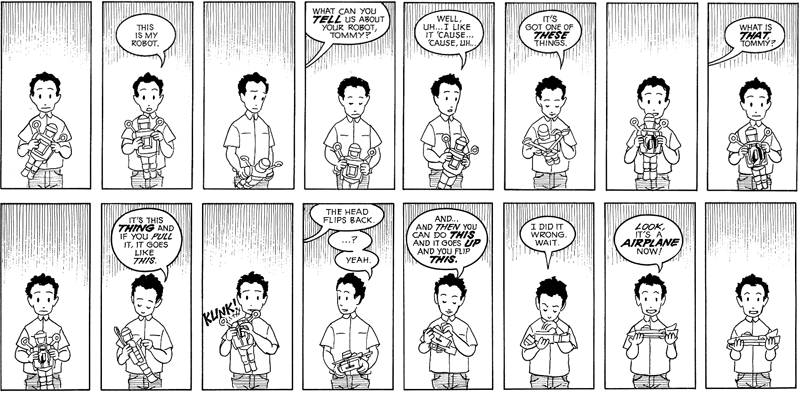
I found Scott McCloud’s chapter, “Show and Tell,” very interesting. I like that he started out with the young boy trying to describe his toy with words and not being able to really say what it was or how it worked. I’ve never been into reading comics, but I can appreciate their art of storytelling. Before reading this chapter, I assumed writing comics was simple. I didn’t realize that there are so many ways that words and pictures can work together. McCloud breaks up the different ways in to categories, which I find very helpful. I also liked his description of words and pictures acting like partners in a dance. He says, “Each one takes turns leading…when both partners try to lead, the competition can subvert the overall goals.”
To explain each category, I tried to find examples, or pictures, that would help illustrate my words. It was a lot harder finding an example of each than I thought it would be. Click on the pictures to make them larger.
1. Word specific: pictures illustrate but don’t significantly add to a largely complete text
I chose this comic because if you just looked at the pictures, you could come up with a different meaning than what you get from the text. After you read the text, though, the picture makes more sense.


To explain each category, I tried to find examples, or pictures, that would help illustrate my words. It was a lot harder finding an example of each than I thought it would be. Click on the pictures to make them larger.
1. Word specific: pictures illustrate but don’t significantly add to a largely
complete textI chose this comic because if you just looked at the pictures, you could come up with a different meaning than what you get from the text. After you read the text, though, the picture makes more sense.

This comic is all about the pictures. The words really are the "soundtrack" to the action taking place.

3. Duo-Specific: both words and pictures send essentially the same message
You could just look at the pictures and grasp the message (and vice versa).

4. Additive: words amplify or elaborate on an image or vice versa
In this comic, the words aren't even necessary. You can get the message by just looking at the picture. The words are extra.
5. Parallel: words and pictures seem to follow very different courses without intersec ting
ting
This was the hardest example for me to find. It may be a stretch. I chose it because the text and the pictures don't really make sense together. The text and the picture seem to be two different stories.

6. Montage: words are treated as integral parts of the picture
I couldn't find a comic example for this, but the picture works for the whole idea of words being used to make up the picture.
7. Interdependent: words and pictures go hand in hand to convey an idea that ne ither could convey alone
The text and the pictures work together nicely. In this case, the text says more than the picture, so the picture is allowed to be more free.
Monday, March 30, 2009
Everything is Miscellaneous Ch. 5-6
“The Laws of the Jungle” was all about tagging, which allows you to assign a name to any page, post, photo, video, etc. to help you remember things your way. I understand the importance of tagging with the amount of information we have readily available to us these days. And since there is so much information, it’s clearly difficult to keep track of it all and organize it in ways that work for everyone. While Krug applauded the use of tabs, similar to folders, Weinberger says that folders are a disadvantage because an item can only go in one place. Tags are metadata that describe an item or piece of information, which allows individuals to find that item or piece of information when browsing or searching. Since anyone can assign a tag, there are many opportunities to find what you’re looking for.
When reading this chapter, the first thing that came to mind was Patrick’s reading posts. When we first began our blogs at the beginning of the semester, I wasn’t aware of the concept of tagging, and I was confused as to why he had so many things highlighted in his text, and a long list of random words in a column down the side of his post. I thought maybe Blogger was the one doing it, but then I realized my posts weren’t automatically being randomly tagged too (or what Blogger calls “labeled”). Now I realize that he uses tags to give people further information on what he is talking about or referencing, and also to help people find what they’re looking for easier and faster (and also because he “loves tagging”).
At the end of the chapter Weinberger lists four principles regarding the way we organize physical objects and ideas.
- Filter on the way out, not on the way in (don’t assume something is of no value right away).
- Put each leaf on as many branches as possible (makes something easier to find, more usable, and more profitable).
- Everything is metadata and everything can be a label (metadata is what you already know and data is what you’re trying to find out, makes sites easier to use, everything is connected).
- Give up control (users are in control instead of the owners of the information).
Other than Patrick's blog, popular websites that use tagging include Flickr and Twitter.
Friday, March 13, 2009
Don't Make Me Think (94-185)
One point I found particularly interesting in the second half of Krug's Don't Make Me think was "Nothing beats a good tagline." It made me wonder if I ever even pay any attention to taglines. So I decided to take a look at some sites I frequently use, as well as some popular ones, to see what their taglines are. My first stop was facebook. Obviously it's one of the most popular sites going right now, so I figured its tagline would be something catchy, humorous, or maybe even quirky. This was not the case, however, and instead I was left disappointed. "Facebook helps you connect and share with the people in your life." Talk about boring (and maybe even a bit vague). My first thought was, "they couldn't come up with something better than that?"
So I went on with my search...
Youtube's "Broadcast yourself" is nice and short, and it certainly works, but maybe they could come up with something more creative. iTune's tagline is a bit generic: "The best place for Games, Movies, Music, and much more - All for iPod." The tagline for the Public Relations example I used for the first half of Krug's book is, "Advancing the Profession and the Professional." I like it, but it kind of blends in with the rest of the page. And one of my favorite taglines that I think is really charming is Kay Jewelers, "Every Kiss Begins with Kay."
Then I came across a neat website all about taglines. Eric Swartz, "The Tagline Guru," offers some more information on taglines, like what they are, their benefits and objectives, and different types of taglines. He also has a list of The 100 Most Influential Taglines Since 1948. Check them out, it's pretty interesting. Some of my favorites include:
So I went on with my search...
Youtube's "Broadcast yourself" is nice and short, and it certainly works, but maybe they could come up with something more creative. iTune's tagline is a bit generic: "The best place for Games, Movies, Music, and much more - All for iPod." The tagline for the Public Relations example I used for the first half of Krug's book is, "Advancing the Profession and the Professional." I like it, but it kind of blends in with the rest of the page. And one of my favorite taglines that I think is really charming is Kay Jewelers, "Every Kiss Begins with Kay."
Then I came across a neat website all about taglines. Eric Swartz, "The Tagline Guru," offers some more information on taglines, like what they are, their benefits and objectives, and different types of taglines. He also has a list of The 100 Most Influential Taglines Since 1948. Check them out, it's pretty interesting. Some of my favorites include:
- Got milk? (1993) --California Milk Processor Board
- Just do it. (1988) --Nike
- Tastes great, less filling. (1974) --Miller Lite
- Melts in your mouth, not in your hands. (1954) --M&M Candies
- There are some things that money can’t buy. For everything else there’s MasterCard. (1997) --MasterCard
- What happens here, stays here. (2002) --Las Vegas
- The quicker picker-upper. (1991) --Bounty
- Betcha can’t eat just one. (1981) --Lay’s Potato Chips
- Think outside the bun. (1998) --Taco Bell
- Don’t get mad. Get GLAD. (early 1980s) --GLAD
So basically some good things Krug says to keep in mind when coming up with a tagline are: clear, informative, just long enough, differentiation, clear benefit, personable, lively, and sometimes clever. Things to avoid include being vague and/or generic. It's also important to have your tagline placed where users expect to find it (below, above, or next to the site ID).
Another part of this reading that I enjoyed was "The Reservoir of Goodwill." I can't help but agree with Krug when he says, "The reservoir is limited, and if you treat users badly enough and exhaust it there's a good chance that they'll leave....they may not be as eager to use your site in the future, or they may think less of your organization" (163). I think this is so true. I hate to be asked irrelevant information, I don't want to search all over the place for something just to find it wasn't there in the first place, and I don't want to use a website that makes me feel stupid, confused, is unorganized or is unprofessional.
Sunday, March 8, 2009
Don't Make Me Think (1-93)
I think Steve Krug is successful at pointing out his principles because he explains them well, and also gives examples to show the reader exactly what he means. I find him credible because he clearly shows that he knows what he is talking about when he backs himself up. While I was reading, I was constantly saying "Oh yea, that's so true." Most of what he has to say really is commonsense, and he explains that anyone can understand web usability. In his Introduction he says, "It's not rocket surgery....Like a lot of common sense, though, it's not necessarily obvious until after someone's pointed it out to you" (5). And Krug is just the guy to point it out to us.
"Don't make me think." These four words seem simple, but they mean so much when it comes to designing a webpage. When I'm on a webpage, I don't want to have to do any unnecessary work. If a webpage makes me feel overwhelmed and/or frustrated, chances are I'm never going to use it again. Design can be simple and still be visually appealing. I'm even a fan of making something original or unique (which was one of my groups rules in our Good, Bad, Ugly assignment). But being creative doesn't mean doing something so outrageous or different that you confuse your audience. Standards and conventions are still important because people like to feel like they know what they're doing or they know where they are. You will end up alienating your audience if you ignore some of the vital conventions that Krug points out in chapter 3, "Conventions are your friends" and chapter 6, "Web navigation conventions."
Noise is another principle Krug discusses. When there's too much going on, it's easy to become overwhelmed. You waste time asking yourself where you should start first. I understand there are some webpage’s that have a lot of important information they need to get to their audience, but there are also ways to design and organize that information so it's user-friendly (you can make tabs or sections, you can space things out, you can introduce stories and have a link to read more instead of making the whole thing available, etc.) An organization that I think does a good and bad job at organizing its webpage is the Public Relations Society of America. This is one of those websites that has a ton of information, but it is relatively easy to navigate around. Some good things about the design include:
- Each "chunk" of information is broken up into clearly defined areas.
- No happy talk (that I have noticed anyway).
- No unnecessary instructions.
- Sections with sub-sections (you can click on just the section header for general information, or go to a sub-section if you have a more specific idea of what you're looking for).
- Site ID is located in the upper left corner, and is clickable to bring the user back to the Home page (and there's also a Home link that can be clicked).
- Search option for those who don't want to browse.
- Page names (although they could stand out a bit more).
- Good use of breadcrumbs. (Home > Awards > Individual Awards > PR Professional of the Year Award).
- Navigation box on the left hand side of the page.
Here are some negative aspects of the webpage that I've noticed:
- Could use a better visual hierarchy.
- Could be more obvious about what’s clickable.
- Could use a "you are here" indicator (maybe the section you're in could be highlighted or have some way of making it stand out once its clicked).
- It's a little noisy. Unless you know specifically what you're looking for, there's a lot going on and many things to click on--you might not know where to start.
Subscribe to:
Posts (Atom)